
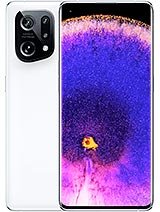
Rs. 189,999 PKR
Overview
| Model | Oppo Find X5 |
| Launch Date | Announced: Released: |
| NetworK | GSM / CDMA / HSPA / EVDO / LTE / 5G |
| Body | Dimensions: Weight: Build: SIM: |
| Display | Type: Size: Resolution: Protection: |
| Platform | OS: Chipset: CPU: GPU: |
| Memory | Card Slot: No Internal: |
| Main Camera | Quad: Features: Video: |
| Selfie Camera | Single: Features: Video: |
| Sound | Loudspeaker: Yes, with stereo speakers 3.5mm jack: No 32-bit/384kHz audio Tuned by AKG |
| Comms | WLAN: Wi-Fi 802.11 a/b/g/n/ac/6e/7, tri-band, Wi-Fi Direct Bluetooth: 5.4, A2DP, LE Positioning: GPS, GLONASS, BDS, GALILEO, QZSS NFC: Yes Radio: No USB: USB Type-C 3.2, DisplayPort 1.2, OTG |
| Features | Sensors: |
| Battery | Type: Li-Ion 5000 mAh Charging: |
| Misc | Colors: |
Key Specifications & Features of Oppo Find X5
| Feature | Details |
| Release / OS | Launched March 2022, ships with ColorOS 12.1 (based on Android 12) |
| Chipset / CPU | Qualcomm Snapdragon 888 |
| RAM & Storage | Options like 8 GB / 12 GB RAM + 128 GB / 256 GB storage (UFS 3.1) |
| Display | 6.55-inch AMOLED, FHD+ (2400 × 1080), 120 Hz refresh rate |
| Battery & Charging | 4,800 mAh battery, supports 80 W wired fast charging (SuperVOOC) and 30 W wireless charging |
| Cameras | Triple rear: 50 MP (wide) + 50 MP (ultra-wide) + 13 MP (telephoto, 2× optical) Front: 32 MP |
| Sensors, Connectivity & Others | In-display fingerprint (optical), face unlock, NFC, 5G, Wi-Fi 6, Bluetooth 5.2 No microSD expansion slot |
| Build & Dimensions | Dimensions: ~ 160.3 × 72.6 × 8.7 mm, weight ~ 196 g Back: glass (not ceramic as in Pro) No official IP water/dust resistance rating for the standard X5 (unlike the Pro) |
Frequently Asked Questions (and Common Issues) Related to the Oppo Find X5
What about the water / dust resistance of Oppo Find X5 is it waterproof?
Oppo Find X5 does not have IP68 or IP rating.
What is the charging capability of the Oppo Find X5?
- Oppo Find X5 comes with 4,800 mAh battery. It is decent for a moderate use. 1. What is the charging capability of the Oppo Find X5?
- The Oppo Find X5 offers 80 W wired fast charging for quick recharging.
- It also supports 30 W wirelesses charging for convenience without cables.
Are there any common camera and image quality issues with the Oppo Find X5?
- The telephoto lens (2×) is relatively basic compared to periscope or high zoom options in some flagship devices.
- In portrait mode or low-light situations, faces may appear softened, or detail could be lost.
- Some users report video compression or stuttering when uploading to social media, particularly noted in the Pro variant.
What display or screen problems have been reported with the Oppo Find X5?
- Some users have noticed a green line on the screen, even if the phone has not been physically damaged.
- The AMOLED screen with curved edges may encounter issues with certain misaligned screen protectors.
- Brightness levels can sometimes be inadequate for optimal readability in very bright outdoor light.
What software, sensor, rotation, or gyroscope issues might the Oppo Find X5 experience?
- Users have reported problems with auto-rotation and gyroscope functionality, causing the UI to not rotate correctly.
- ColorOS (Oppo’s Android skin) includes extra apps, features, and settings that may lead to “bloat” and unnecessary battery or resource consumption.
- Issues with Android Auto have also been documented, leading to reboots or instability.
What connectivity or network problems have users faced with the Oppo Find X5?
- Some users experience occasional Wi-Fi or LTE connectivity issues in low signal areas, especially after updates.
- It IS important to verify APN settings and check the network mode (5G/4G), removing or reinserting the SIM card may also help troubleshoot.
- Installing the latest software updates can resolve certain connectivity bugs.
What should I do if a green line appears on the Oppo Find X5 screen?
- First, try rebooting the device.
- Booting in safe mode can help determine if it is a software-related issue.
- Reset the display settings or turn off adaptive display features.
- If the problem persists, it could indicate a hardware defect that may need repair or screen replacement under warranty.
What are the warranty and repair options for the Oppo Find X5?
- In some regions, the warranty lasts for 24 months.
- It is recommended to use authorized service centers and original parts to maintain warranty validity.
- Always back up your data before sending the device for repairs.
How long can you expect software updates and security patches for the Oppo Find X5?
- Software support varies by region it is expected to receive several Android version updates and security patches.
- The longevity of support may not match some brands offering 5-7 years of service.
- Users should check with local Oppo representatives or retailers for specific policies in Pakistan.
What tips can help optimize usage and avoid issues with the Oppo Find X5?
- Always use the original charger and cable for fast charging.
- Avoid exposing the device to water, dust, or extreme conditions.
- Minimize frequent charging cycles from 0% to 100%.
- Monitor background apps, uninstall those that are unnecessary, and limit auto-start features.
- Keep the operating system and firmware updated.
- Employ a good screen protector and case to shield against physical damage.